If you’re anything like me, your mind is always full of ideas.
Half-formed concepts, scenes, painting ideas, sketches. And sometimes, it all feels a little too much.
I created this Notion template to give all of that somewhere to live (and so your business can feel organised without your creativity feeling boxed in).
This is the exact workspace I use to run Daedreams: planning paintings, organising content, setting goals, keeping an eye on money, and turning ideas into plans before they disappear.
Inside, you’ll find space to:
- plan paintings, collections, launches and creative projects
- organise ideas from first 'spark' to release
- build and schedule your content
- capture inspiration before it slips away
- set big goals and break them into manageable steps
- without pressure
- plan income and keep an eye on business cashflow
- braindump, reflect and organise everything taking up space in your head
- keep your creative business connected in one calm, visual workspace
- structure your week in a way that feels calm, not chaotic
- keep notes, resources and ideas in one beautiful home
What’s Included
The Digital Studio is built around five connected areas, each with its own purpose, while still working together as one system.
They're all designed to organise your creative world without overwhelming it.
1. Homepage — Your Creative Dashboard
Your at-a-glance home base for everything currently happening in your studio. Includes:
- Week-at-a-glance overview
- Snapshot of upcoming tasks/events
- Yearly goals overview
- Quick Access navigation menu
A simple snapshot of what needs your attention, visible the moment you open the studio.
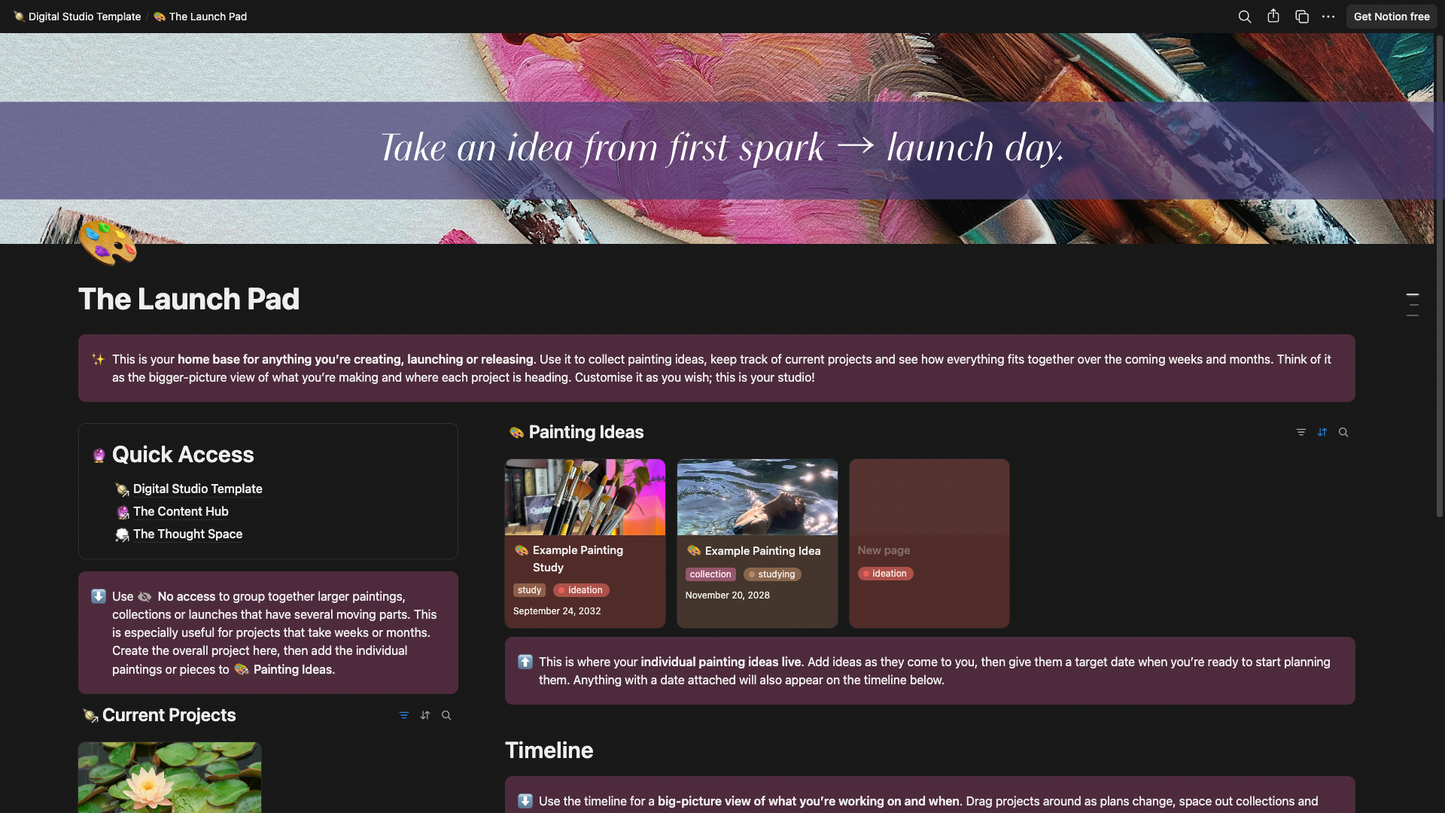
2. Launch Pad — Your Creative Project Planner
The space for everything you’re making, developing or preparing to release. Includes:
- Painting Ideas database
- Current Projects
- Project and launch timeline
- Moodboards
- Target dates and project planning
Use it to take an idea from “I want to make this” all the way through to a finished painting, collection or launch.
3. Content Hub — Your Content Creation Centre
The home of your content strategy, ideas and planning. Includes:
- Week-at-a-Glance
- Content Calendar
- Content Bank
- Story Schedule
- Email Marketing planner
- Signature Series planner
-
My personal Content Handbook
The Content Handbook contains 2+ years of lessons, frameworks and things I’ve learned through creating content for my own business, simplified into one practical resource. It covers topics including visual identity, content pillars, filming, hooks, post types, providing value and the Magnet, Mirror & Money content framework.
This is the system I come back to when planning my own content.
4. Thought Space — Your Behind-the-Scenes Mind
A home for the more 'business-y' parts of being an artist. Includes:
- Major Goals
- Mini Goals
- Current Projects
- Money Roadmap
- Cashflow Checker
- Braindumping space
Use it to get ideas out of your head, make sense of what you’re working towards and keep the business side of your creative life visible without letting it take over.
5. Master Calendar — The Heart of the Studio
The connected database running through the entire template.
Your content, paintings, projects, launches and important dates can all feed into the Master Calendar, giving you one place to see what’s happening across the coming weeks and months.
Instead of managing five separate calendars, everything stays connected.
Made to be customised
The studio comes structured and ready to use, but it isn’t a system you have to follow perfectly. Change the colours. Delete sections you don’t need. Rename things. Move things around. Build on it as your business grows.
Throughout the template, you’ll also find pink guidance notes from me explaining what each section does, how different pages connect, and how you might use them.
Whether you’re completely new to Notion or already live inside it, the aim is simple: give your creative business enough structure to support your ideas — without overwhelming them.
Disclosure: This is a digital product. No physical product will be shipped. After purchase, you’ll receive access to the Digital Studio template, which you can duplicate directly into your own Notion workspace and customise as you wish. You only need a free Notion account to use it.
Due to the nature of this digital product, all sales are final and refunds cannot be processed. If you have any questions about the template or whether it’s right for you, please contact me before purchasing.